
Website Accessibility
Sub-headings are important to add clear format to your page, but it is also important that they are added in a logical sequence so screen-readers can make sense of page structure. The good news is this is very simple to achieve.
The following video shows you how to correctly add a sub-heading in terms of format and for accessibility. No sound is required as there are captions and it is only 47 seconds long (you might need to pause some parts though!).
The page heading, which has a blue background, and usually looks like this:

uses Heading 1 and the Page Heading Blue style. This is the only time you should ever use either Heading 1 and the Page Heading Blue style.
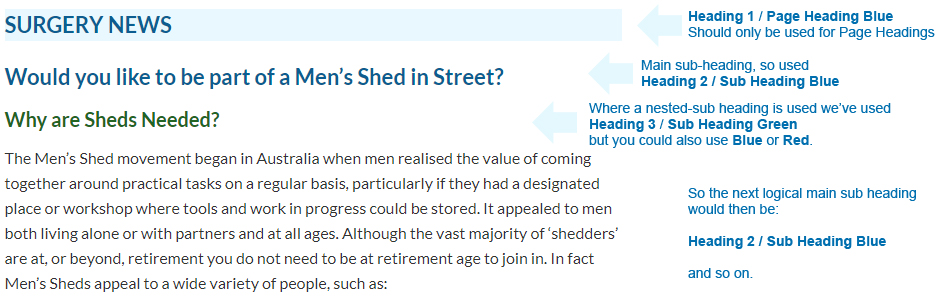
So the next heading level for all your main sub-headings should be Heading 2. To style this you should also use one of sub-heading-blue, sub-heading-green or sub-heading-red.
In summary, the page structure to, not only look good, but also comply with WCAG 2.1 AA accessibilitty regulations, should be (as in this example taken from a live page):
Understanding accessibility requirements for public sector bodies (.gov reference page)
How the accessibility regulations will be monitored and enforced (.gov reference page)